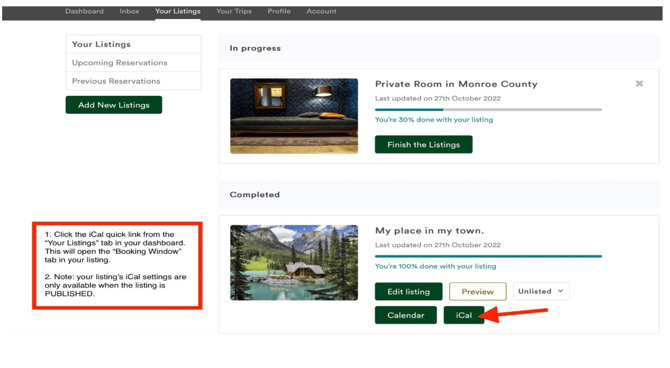
Your Lodge Lovers listing must be Published before calendar linking can occur.
Follow these instructions to export and import:
FIRST
1. Log into your LodgeLovers.com host profile.
2. From your host dashboard, navigate to "Your Listings."
3. Click on the iCal quick link on the listing you wish to sync.
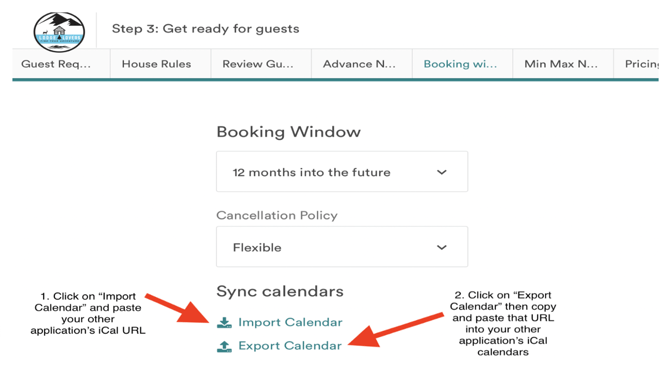
4. Navigate to your "Booking Window," which will contain links to both export your Lodge Lovers listing's iCal URL and also import other platforms' iCal URLs into your Lodge Lovers hosting platform.
SECOND
- Copy the export iCal URL
- Navigate to each other hosting platform and follow their steps to using your Lodge Lovers iCal URL to sync to your listing on each other's booking platform.
- While on the other booking platform sites, copy your booking's iCal link.
- Return to your Lodge Lovers booking platform and import the other booking platform's iCal URL.
- Repeat this process until your Lodge Lovers calendar is "linked" with all other hosting platforms and channel management systems you are using to host your stay(s).